CALLGOOSE
CALLGOOSE
BLOG
24 July 2026 | Sophia Mark
5 Minute Read
Introduction
Webhooks play an important role in connecting applications and sharing operational events between systems. When an incident is created, acknowledged, unacknowledged, or resolved, webhook events can send relevant information to connected applications.
But when an expected webhook event does not reach the receiving system, troubleshooting can become difficult. Teams may start checking the external application, reviewing endpoint configurations, or comparing incident activity without knowing what happened during webhook delivery.
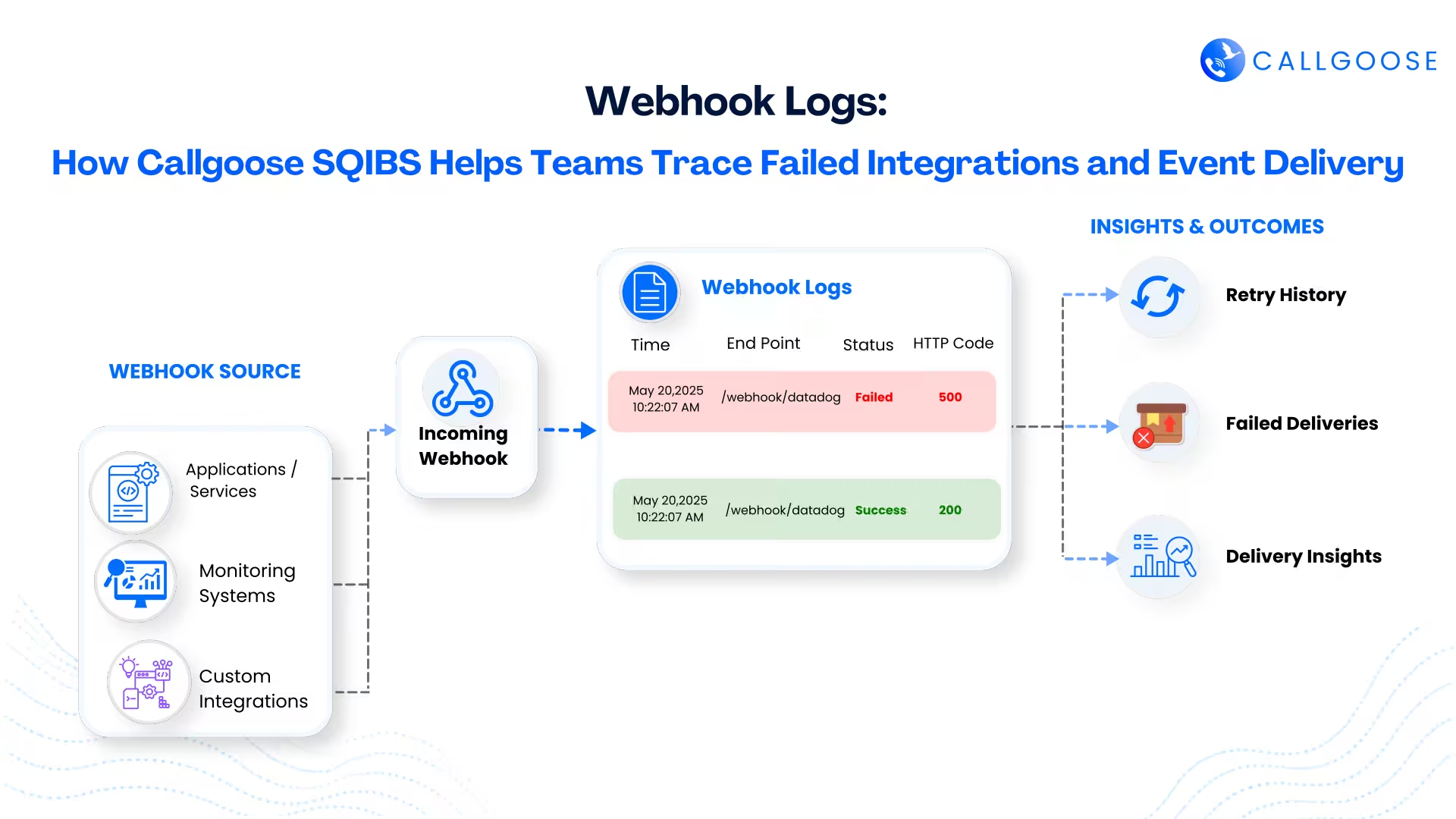
This is where Webhook Logs become important. Callgoose SQIBS provides visibility into webhook activity, helping teams trace delivery issues, narrow down the problem, and troubleshoot failed integrations without relying only on guesswork.
When an Expected Webhook Event Goes Missing
Consider an incident that is resolved in Callgoose SQIBS. A webhook is configured to send the incident resolution event to an external application, but the expected update does not appear.
What happened to the webhook event?
Without visibility into webhook activity, teams may need to investigate multiple systems before identifying where the problem requires attention. The receiving endpoint may be unavailable, the webhook configuration may need review, or the request may have experienced a temporary delivery issue.
Webhook Logs give teams a starting point for investigating what happened during webhook activity.
Tracing Webhook Activity With Webhook Logs
Callgoose SQIBS provides a dedicated Webhook Log within the Logs section. When an expected event does not reach a connected application, teams can review webhook activity as part of the troubleshooting process.
Instead of immediately assuming that the external application is responsible, engineers can investigate the webhook delivery path and narrow down where further troubleshooting is required.
For example, if an incident event was expected to trigger a webhook, teams can review the related webhook activity and use the available information to investigate the integration.
Webhook Logs help teams move from “the event is missing” to understanding what happened during webhook delivery.
How Webhook Events Work in Callgoose SQIBS
Callgoose SQIBS supports outgoing webhooks that send incident event information to external applications. Webhooks can be configured at the Global, Team, or Service level based on operational requirements.
Teams can configure webhook events such as:
When a configured event occurs, Callgoose SQIBS sends an HTTP request to the specified endpoint. Teams can configure the webhook URL, HTTP method, authorization, custom headers, HMAC signing, and request data using available placeholders.
Because webhook events can connect incident activities with external systems, visibility into webhook delivery becomes important when the expected information does not arrive.
Reducing Guesswork During Integration Troubleshooting
Webhook integration problems can involve multiple systems. Engineers may need to check the incident event, webhook configuration, and destination endpoint.
Without a clear starting point, troubleshooting can become a process of checking each system individually.
Webhook Logs help provide visibility into webhook activity so teams can narrow their investigation. Instead of asking only whether the external application received the event, teams can also investigate what happened when the webhook delivery was attempted.
This helps engineers focus their troubleshooting on the integration path that requires attention and reduces unnecessary investigation across unrelated systems.
Supporting Webhook Delivery With Retry Controls
Some webhook delivery issues are temporary. A destination endpoint may be briefly unavailable, or a short-term communication problem may affect the request.
Callgoose SQIBS allows teams to configure a retry count from 0 to 4 and define a retry interval for failed webhook requests. Teams can also configure failure notification emails for webhook request failures or webhook deactivation.
These features support webhook delivery management, while Webhook Logs provide the visibility teams need when investigating webhook activity and delivery issues.
Identifying Repeated Webhook Failures
Repeated failures may indicate that a webhook integration requires attention.
If a webhook fails consecutively six times, Callgoose SQIBS marks the webhook as INACTIVE. The webhook must be manually activated from the dashboard before receiving future webhook events.
When an expected event is missing, webhook activity and webhook status can help teams understand whether repeated failures have affected the integration. Engineers can then investigate the configuration or destination endpoint, address the issue, and reactivate the webhook when appropriate.
Testing Webhooks Before Operational Use
Callgoose SQIBS also provides a Test option during webhook configuration. Teams can send a test webhook and review the result before saving the configuration.
Testing can help identify configuration issues when setting up a new endpoint or changing authorization, headers, or request data.
While testing helps identify issues during configuration, Webhook Logs remain important for tracing webhook activity when delivery problems occur during ongoing operations.
Where Webhook Logs Are Useful
DevOps and SRE Teams: When an incident event does not appear in a connected operational system, teams can review webhook activity and narrow down the delivery issue.
IT Operations Teams: Engineers can investigate webhook activity when troubleshooting communication between Callgoose SQIBS and external applications.
Multi-System Environments: Organizations using multiple connected operational tools can use Webhook Logs to gain better visibility when an expected event is missing.
Incident Response Workflows: Teams can trace webhook activity when incident creation, acknowledgment, unacknowledgment, or resolution events do not reach the configured endpoint as expected.
Conclusion
Webhooks help operational systems exchange incident event information quickly. But when an expected webhook event does not reach a connected application, teams need visibility into what happened during delivery.
Callgoose SQIBS Webhook Logs help teams trace webhook activity, investigate missing events, and narrow down integration delivery issues instead of troubleshooting through guesswork.
Retry controls, failure notifications, webhook status handling, and testing support the webhook process. Webhook Logs help teams understand what happened when an expected event does not arrive.
By providing better visibility into webhook activity, Callgoose SQIBS helps DevOps, SRE, and IT operations teams troubleshoot integrations more efficiently and maintain reliable communication between connected operational systems.
🔗 Get Started with Callgoose SQIBS: Try Now
If you’re managing critical IT systems or have customer-facing platforms, Callgoose SQIBS is a game-changer! 💡 It’s designed to quickly fix issues, reduce downtime, and boost your support team’s productivity.
Callgoose SQIBS is a cutting-edge automation platform designed to elevate your organization’s resilience, reliability, and operational efficiency. With powerful On-Call scheduling, real-time Incident Management, SLA Tracker and Incident Response capabilities, it ensures your systems are always on and responsive. Whether you need Process Automation, Runbook Automation, Incident Auto-remediation, IT request automation, or Event-Driven Automation and Self-service portal, Callgoose SQIBS empowers you with comprehensive solutions. Stay connected and in control with notifications via Mobile App (Android, iPhone), Email, SMS, Phone Calls in over 30+ languages across 200+ countries, and seamless integrations with Slack & Microsoft Teams. Empower your team to Trigger, Acknowledge, Resolve Incidents and Run Automation Workflow directly from Slack & Microsoft Teams.
Check out these videos to see how it works:
• Watch our quick 30-second video : Watch Here
• What is Callgoose SQIBS? : Watch Here
• Process Automation : Watch Here
• Runbook Automation : Watch Here
• Self-Service Portal : Watch Here
• SLA Tracker : Watch Here
Additionally, here is a helpful blog post on
• why businesses choose Callgoose SQIBS: Why Business Need to Choose Callgoose SQIBS
• Transforming Business Operations with Callgoose SQIBS — Incident Management & Automation Platform
• How Callgoose SQIBS Automation Platform Enhances Efficiency
• Use Cases Industry Sector-wise
• Solutions — By Functionality
Ready to Transform Your Incident Response?
See Callgoose SQIBS in action by exploring our website visit www.callgoose.com, or book a demo to discover how Callgoose SQIBS can optimize your workflows and boost your team’s productivity.
Let’s Talk! Reach out to us today to learn more or get personalized support.
Take the next step toward seamless automation and efficiency. We’re here to assist you every step of the way.
Take Control of Incidents — Anytime, Anywhere!
Looking forward to connecting with you!

BLOG
5m Read

CALLGOOSE
SQIBS
Advanced Automation-first platform with effective On-Call scheduling, real-time Incident Management, Incident Response, and SLA tracking capabilities that keep your organization more resilient, reliable, and always on.
Callgoose SQIBS can integrate with any applications or tools you use, including monitoring, ticketing, ITSM, log management, error tracking, ChatOps, collaboration tools, or any custom applications.
In addition to alerting and response, Callgoose SQIBS enables Automated Incident Remediation, SLA tracking (MTTA, MTTR, uptime), and Incident Response Threshold monitoring, allowing teams to proactively detect risks, prevent SLA breaches, and execute remediation workflows in real time.
A built-in self-service portal empowers end users to handle routine requests independently, significantly reducing operational load on engineering and IT teams.
Callgoose provides enterprise-grade automation, SLA governance, and incident response capabilities at one of the most cost-effective price points in the market.
Unique Features